Note: This documentation assumes that you have a Ghost blog setup and running on a server. If you don't have a Ghost blog setup yet, we highly recommend using Ghost(Pro). You can learn more about installing Ghost here.
Introduction
Thank you for purchasing Bloom! Please take the time to review the documentation below and you'll have your blog set up in no time!
Installation
To install Soleil, head to yourdomain.com/ghost/#/settings/design/change-theme. Click the 'Upload theme' button and upload the soleil.zip file that came with your purchase. Click 'Activate' and the theme is ready to go!
Navigation
Primary Navigation
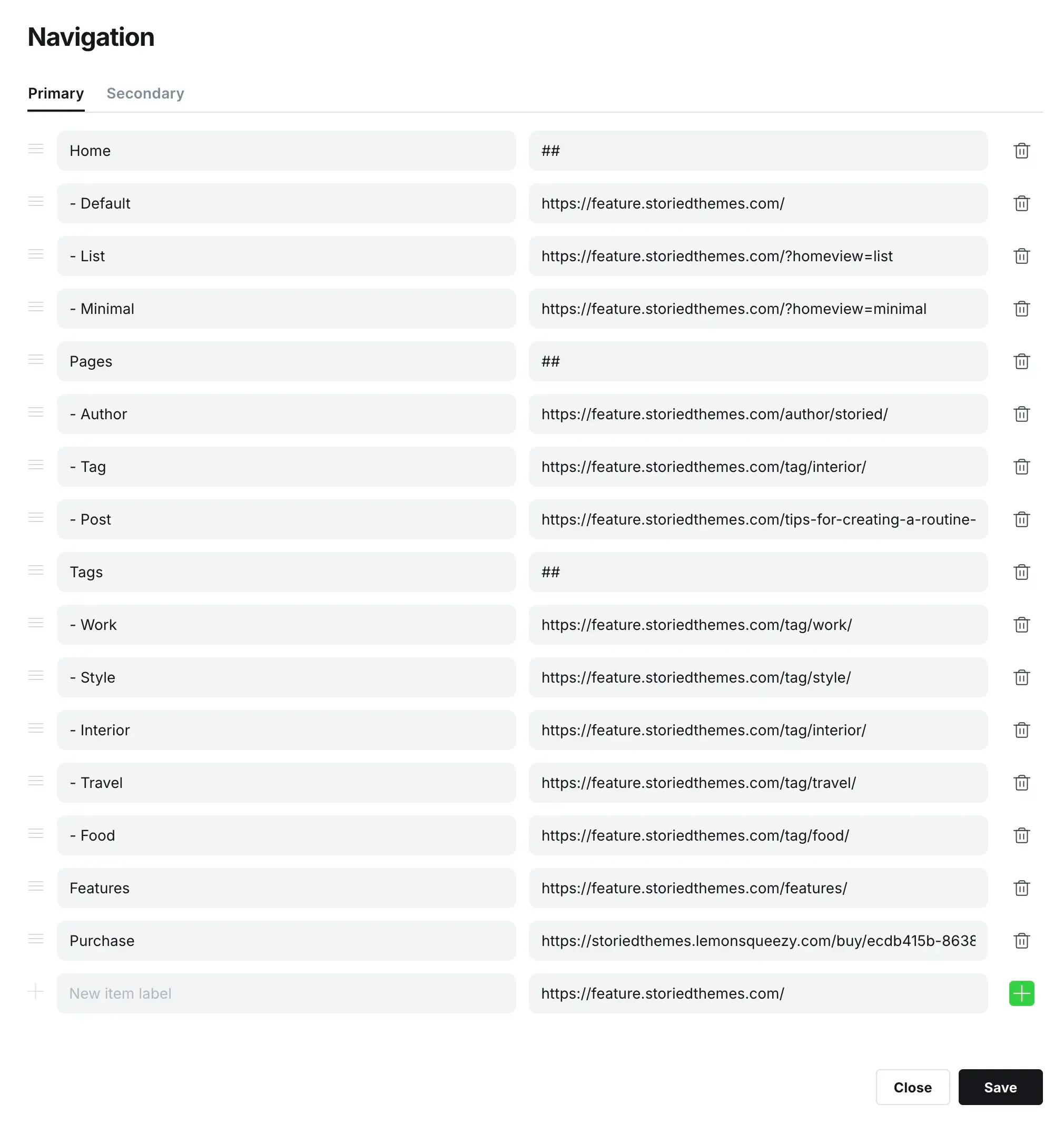
The primary navigation is used in the header. To edit these menus go to yourdomain.com/ghost/#/settings/navigation.
Dropdown Menus:
By default, the primary navigation appears inline. To create dropdown menus, add a new navigation item where you'd like the dropdown to begin and type ## in the URL field. This tells the theme when to start a dropdown. Then to add submenu items to the dropdown, prefix the items below it with -. If you do not prefix an item below, it will end the dropdown.
This is an example of a dropdown menu setup:
Secondary Navigation
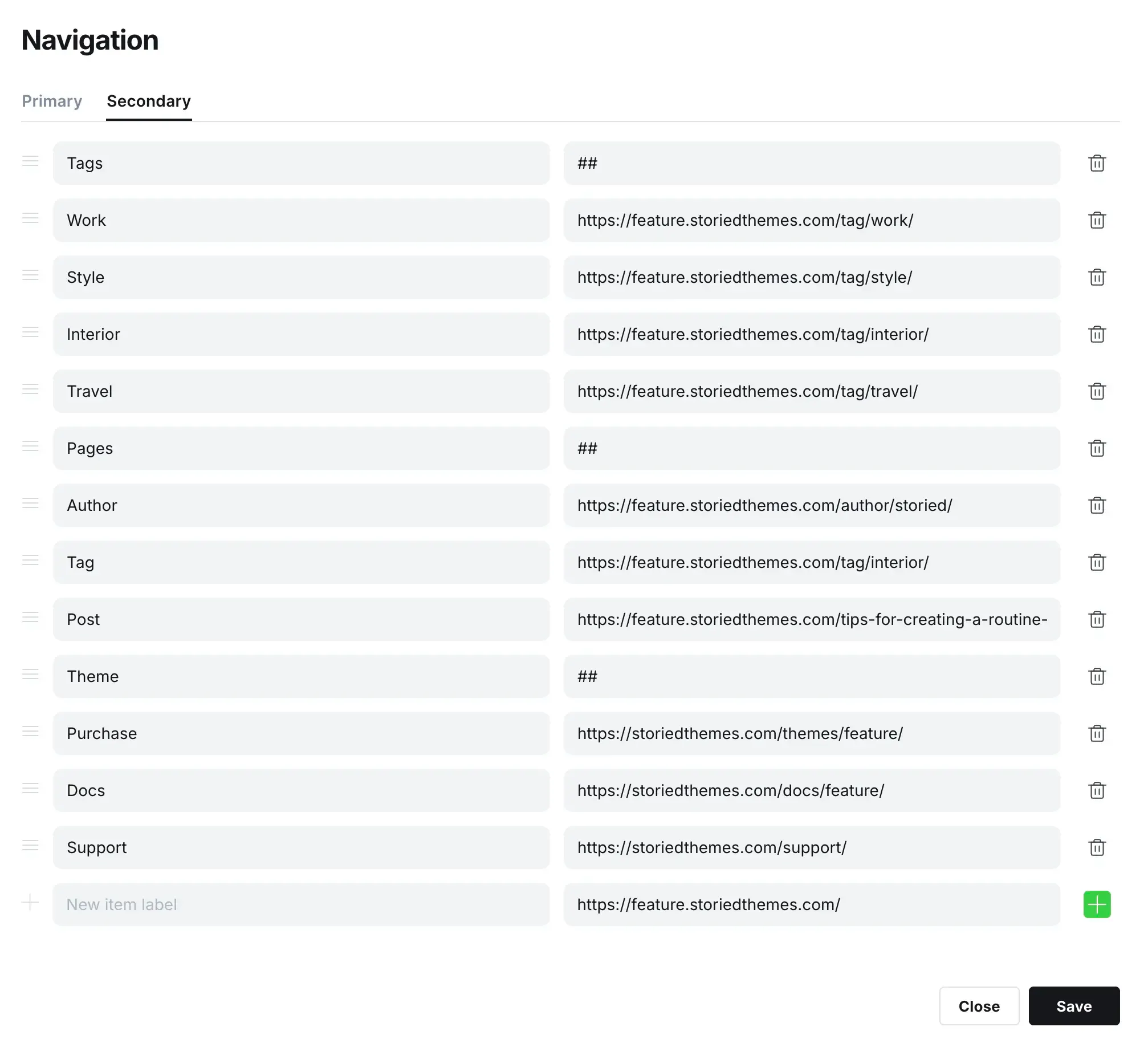
The secondary navigation is used in the footer.
Footer Columns:
By default, the secondary navigation appears inline. To create columns, add a new navigation item where you'd like the column to begin and type ## in the URL field. This tells the theme when to start a column. Note: You DO NOT need to add prefixes to the columns sub items like we did for dropdowns in the primary navigation.
This is an example of a footer menu setup:
Featured Posts
Featured posts are displayed as cards on the homepage. Make sure you have at least 3 posts set as featured to populate the cards properly.
Theme Settings
To update the design settings, head to yourdomain.com/ghost/#/settings/design.
Brand Settings
- Site description: Used in your site meta tag for search engines.
- Accent color: Used to style buttons and links throughout the theme.
- Publication icon: Used as the browser tab icon.
- Publication logo: Used in the header and footer.
- Publication cover: This setting is not used to maintain the design integrity.
Site-wide Settings
- Desktop logo height: Controls the displayed height of your logo in the header on desktop screens (Default: 24px)
- Mobile logo height: Controls the displayed height of your logo on mobile-sized screens. (Default: 22px)
- Footer copyright text: Sets custom copyright text displayed in the footer. Leave blank to use the default text.
- Footer privacy URL: A link to your Privacy Policy page. When set, a "Privacy Policy" link will appear in the footer.
- Footer terms URL: A link to your Terms of Service page. When set, a "Terms of Service" link will appear in the footer.
- Card author: Controls how the author is displayed on post cards. Options: Name, Image + Name, None. (Default: Name)
- Card date: Displays the publish date on post cards. (Default: enabled)
- Card excerpt: Displays the post excerpt on post cards. (Default: disabled)
- Card read time: Displays the estimated reading time on post cards. (Default: enabled)
Homepage Settings
- Intro text: Sets a large heading displayed at the very top of the homepage, above the featured posts. Leave blank to hide the intro section entirely.
- Popular tags: Add a comma-separated list of tag slugs to display a visual "Explore our popular tags" section at the bottom of the homepage. Requires at least 3 tags, each with a feature image set in Ghost. (Example: lifestyle,food,health,tech,travel)
Post Settings
- Table of contents: Displays a table of contents sidebar on post pages. Items are automatically generated from the post's H2 headings. (Default: enabled)
- Post author: Controls how the author is displayed on post pages. Options: Name, Image + Name, None. (Default: Name)
- Post date: Displays the publish date on post pages. (Default: enabled)
- Post read time: Displays the estimated reading time on post pages. (Default: enabled)
Recommendations
- We recommend using an SVG for your publication logo for crisp display on all devices.
- Make sure you always have the correct amount of featured posts set to properly display the cards.
Support
For support inquiries please visit https://storiedthemes.com/support.
Credits
