Publisher Documentation

Note: This documentation assumes that you have a Ghost blog setup and running on a server. If you don't have a Ghost blog setup yet, we highly recommend using Ghost(Pro). You can learn more about installing Ghost here.

Introduction

Thank you for purchasing Publisher! Please take the time to review the documentation below and you'll have your blog set up in no time!

Installation

To install Publisher, head to yourdomain.com/ghost/#/settings/design/change-theme. Click the 'Upload theme' button and upload the publisher.zip file that came with your purchase. Click 'Activate' and the theme is ready to go!

Primary Navigation

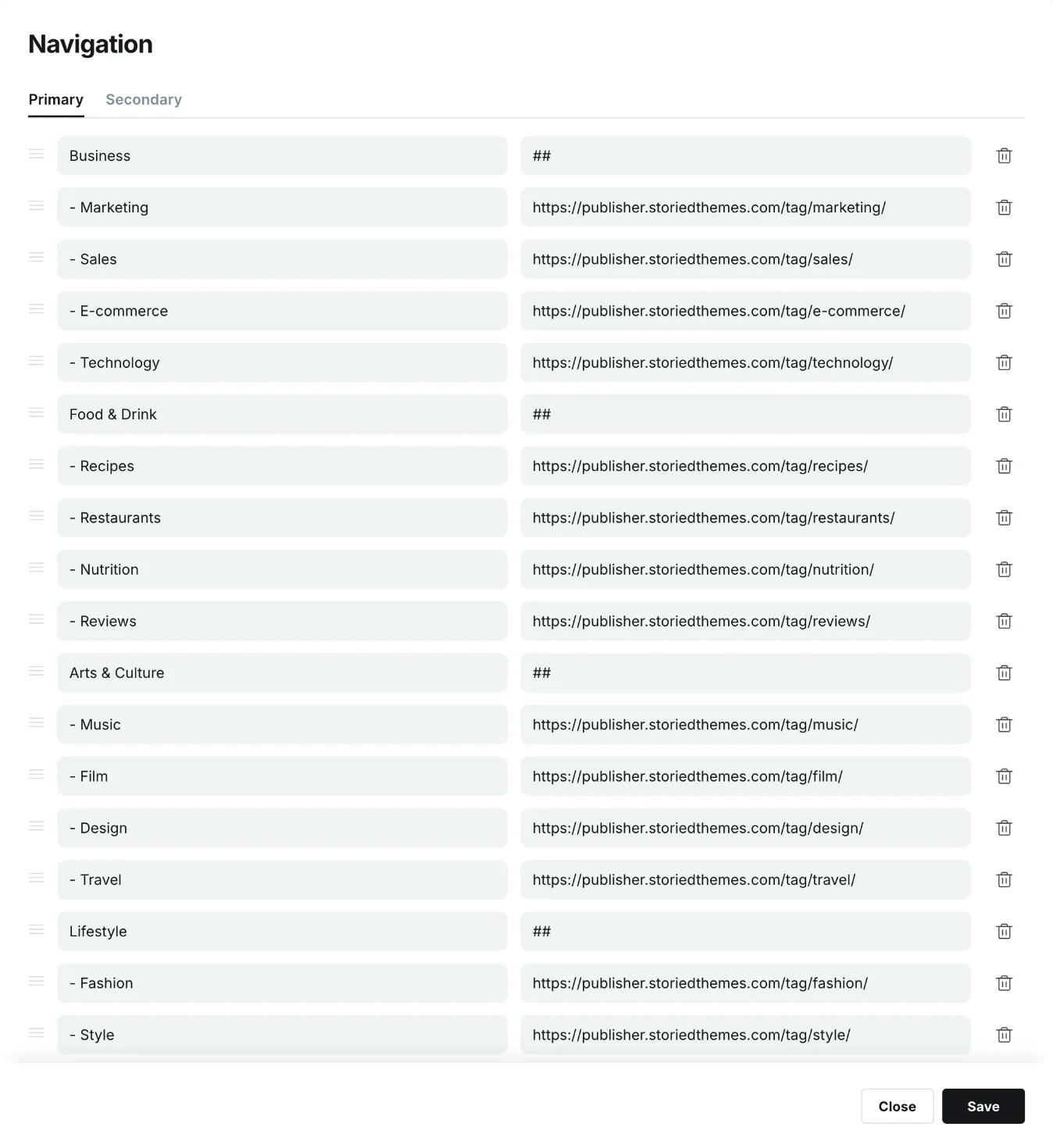
By default, the primary navigation appears as a one level stacked menu in the fly-out menu. To create dropdowns, add a new navigation item where you'd like the dropdown to begin and type ## in the URL field. This tells the theme when to start a dropdown. Then to add submenu items to the dropdown, prefix the items below it with -. Note: If you do not prefix an item below, it will end the dropdown. See example below:
Secondary Navigation

The secondary navigation is used in the footer.

Footer Columns:

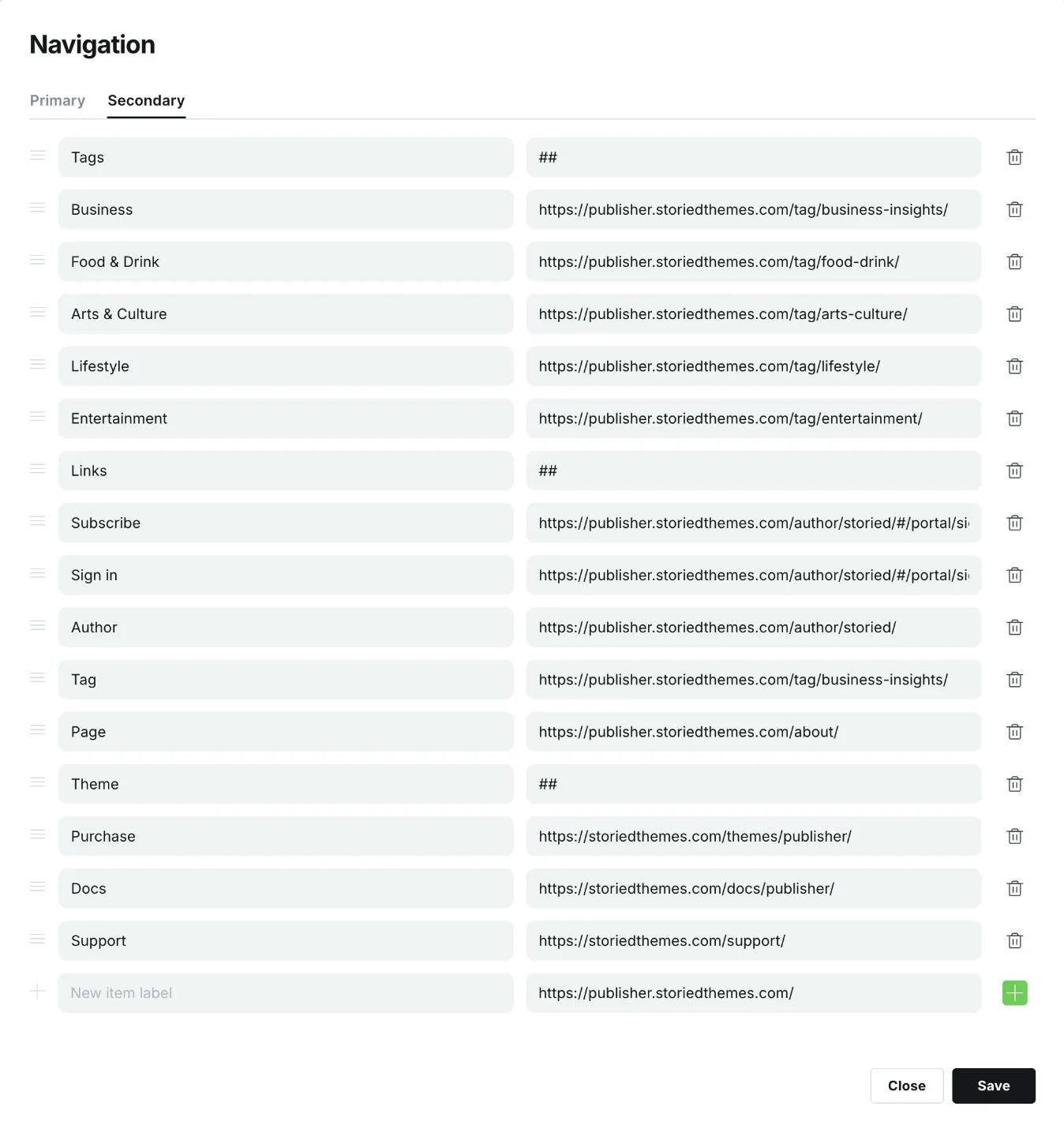
By default, the secondary navigation appears inline. To create columns, add a new navigation item where you'd like the column to begin and type ## in the URL field. This tells the theme when to start a column. Note: You DO NOT need to add prefixes to the columns sub items like we did for dropdowns in the primary navigation.

See example below:
Tag Menu

Publisher includes a special tag-based navigation menu that appears below the header. To enable this feature, configure the "Tag Menu" setting in the theme design settings with the slugs of the tags you want to include in the menu.

Featured posts are displayed in a hero section on the homepage. You can choose between different layout styles: Billboard, Editorial, or Split. Make sure you have at least 5 posts set as featured for the featured posts section to display.

Theme Settings

To update the design settings, head to yourdomain.com/ghost/#/settings/design.

Brand Settings

  • Site description: Used in your site meta tag for search engines.
  • Accent color: Used to style buttons and accent elements throughout the theme.
  • Publication icon: Used as the browser tab icon.
  • Publication logo: Used in the header and footer.
  • Publication cover: This setting is not used to maintain the design integrity.

Site wide settings

  • Accent text color: Sets the color for accent text elements.
  • Logo height: Controls the displayed height of your logo on desktop.
  • Mobile logo height: Controls the displayed height of your logo on mobile devices.
  • Heading font style: Choose between serif (Literata) or sans-serif (Inter) for headings.
  • Heading font weight: Controls the weight of headings (options include various weights).
  • Header color: Choose the background color scheme for the header.
  • Tag menu: Enter tag slugs (comma-separated) to create a tag-based navigation menu.
  • Author slug for socials: Enter the author slug to display social links in the tag navigation area.
  • Footer copyright text: Sets custom copyright text displayed in the footer.

Homepage settings

  • Featured posts: Choose between Billboard, Editorial, Split, or None for featured posts display (default: Billboard). Minimum 5 posts required for featured posts to display.
  • Homepage posts: Choose how to display posts on the homepage (Latest or Sections layout).
  • Featured posts:
  • Featured posts:
  • Homepage sections: When using Sections layout, enter tag slugs (comma-separated, no spaces) to create organized content sections on your homepage.
  • Remove section tag from posts: When enabled, hides section tags from posts that have multiple tags to keep the tag display clean (default: enabled).

Post settings

Show related posts: Toggle to show related posts on single post page.

Recommendations

  • We recommend using an SVG for your publication logo for crisp display on all devices.
  • Make sure you always have at least 5 featured posts set if you want to display the featured posts section.
  • Use the tag menu feature to create topic-based navigation for better content organization.

Support

For support inquiries please visit https://storiedthemes.com/support.

Credits