Note: This documentation assumes that you have a Ghost blog setup and running on a server. If you don't have a Ghost blog setup yet, we highly recommend using Ghost(Pro). You can learn more about installing Ghost here.
Introduction
Thank you for purchasing Feature! Please take the time to review the documentation below and you'll have your blog set up in no time!
Installation
To install Feature, head to yourdomain.com/ghost/#/settings/design/change-theme. Click the 'Upload theme' button and upload the feature.zip file that came with your purchase. Click 'Activate' and the theme is ready to go!
Navigation
Primary Navigation
The primary navigation is used in the header. To edit these menus go to yourdomain.com/ghost/#/settings/navigation.
Dropdown Menus:
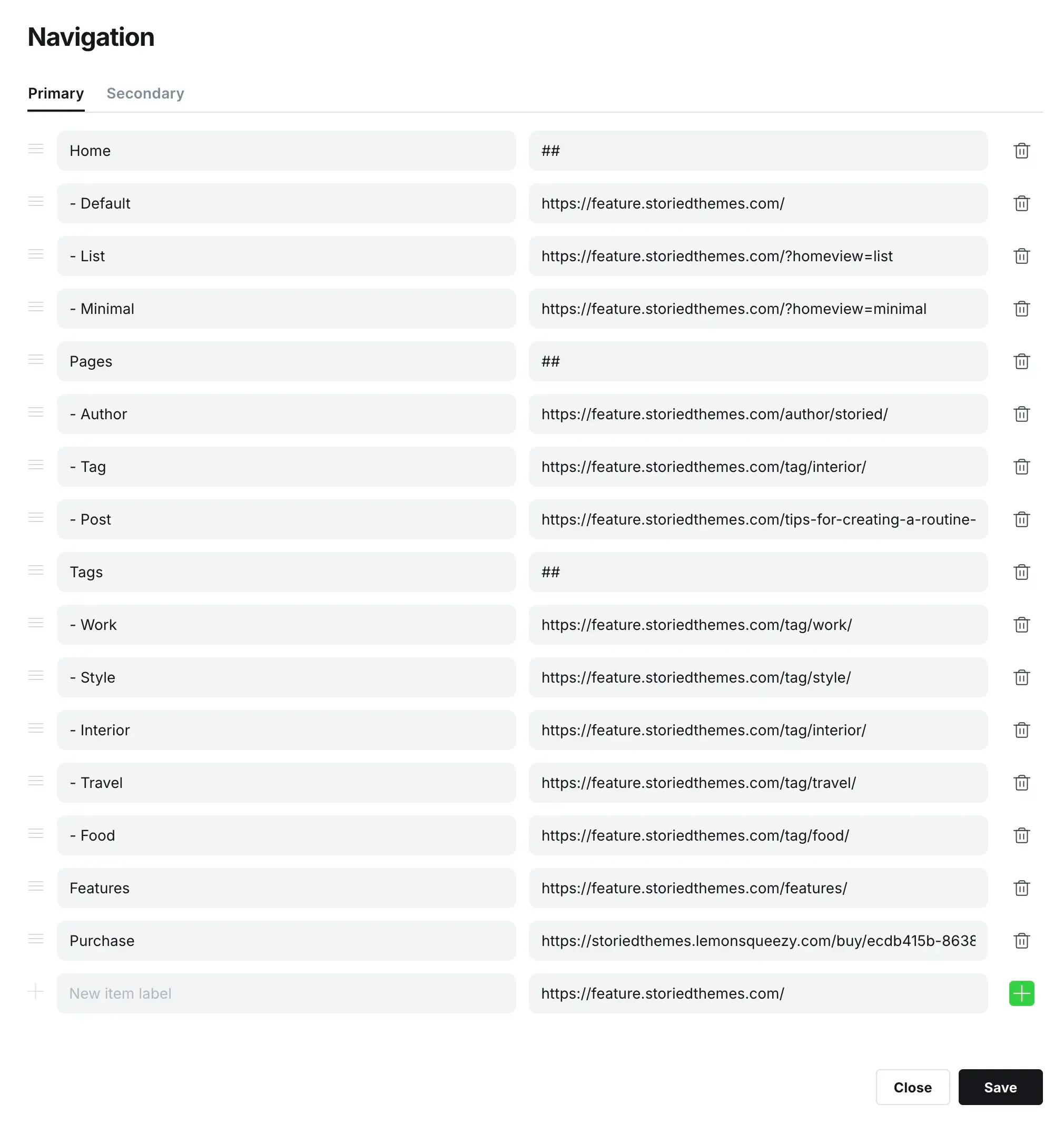
By default, the primary navigation appears inline. To create dropdown menus, add a new navigation item where you'd like the dropdown to begin and type ## in the URL field. This tells the theme when to start a dropdown. Then to add submenu items to the dropdown, prefix the items below it with -. If you do not prefix an item below, it will end the dropdown.
This is an example of a dropdown menu setup:
Secondary Navigation
The secondary navigation is used in the footer.
Footer Columns:
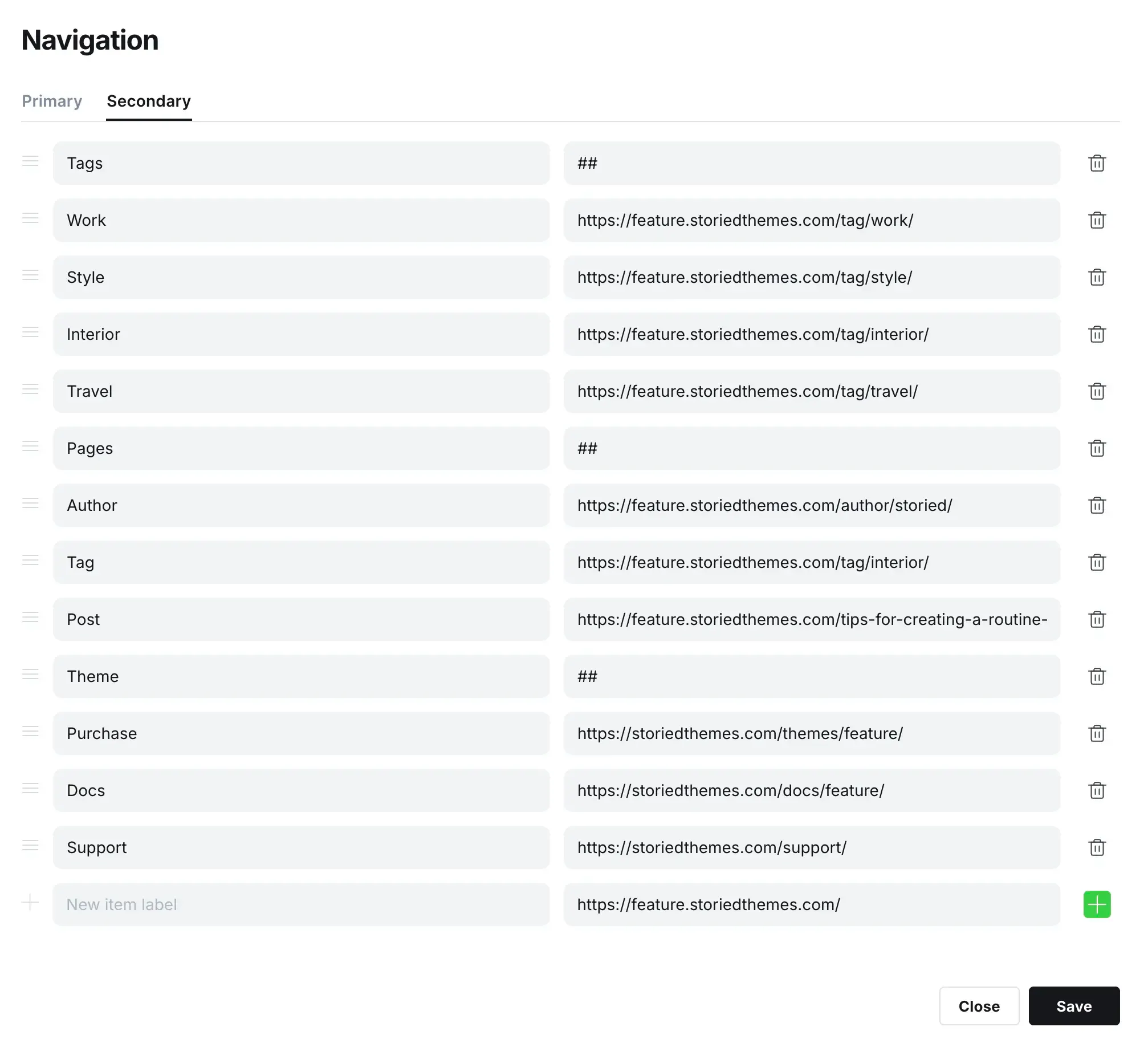
By default, the secondary navigation appears inline. To create columns, add a new navigation item where you'd like the column to begin and type ## in the URL field. This tells the theme when to start a column. Note: You DO NOT need to add prefixes to the columns sub items like we did for dropdowns in the primary navigation.
This is an example of a footer menu setup:
Featured Posts
Featured posts are displayed in a carousel on the homepage. You can choose to display them as a carousel or hide them entirely. Make sure you have at least 5 posts set as featured to populate the carousel properly.
Theme Settings
To update the design settings, head to yourdomain.com/ghost/#/settings/design.
Brand Settings
- Site description: Used in your site meta tag for search engines.
- Accent color: Used to style buttons and links throughout the theme.
- Publication icon: Used as the browser tab icon.
- Publication logo: Used in the header and footer.
- Publication cover: This setting is not used to maintain the design integrity.
Button & Color Settings
- Buttons: Sets the button background color for light mode (default: #000000).
- Buttons text: Sets the button text color for light mode (default: #FFFFFF).
- Dark mode buttons: Sets the button background color for dark mode (default: #FFFFFF).
- Dark mode buttons text: Sets the button text color for dark mode (default: #000000).
Site-wide Settings
- Logo height: Controls the displayed height of your logo (options: 20px-68px, default: 24px).
- Dark mode: Enables or disables the dark mode switcher on your site (default: enabled).
- Dark mode logo: Upload a light-colored logo to use when dark mode is active.
- Post feed layout: Choose between Grid or List layout for your post feed (default: Grid).
- Sidebar: Toggle the sidebar visibility (default: enabled).
- Sidebar subscribe title: Sets the title for the sidebar subscription section (default: "Sign up for insights and ideas").
- Sidebar subscribe text: Sets the description text for the sidebar subscription (default: "Subscribe for the latest news, stories, tips, and updates.").
- Author slug for socials: Enter the author slug to display social links in the footer and sidebar.
- Footer copyright text: Sets custom copyright text displayed in the footer.
Homepage Settings
- Featured posts: Choose between Carousel or None (default: Carousel). Minimum 5 posts required for carousel.
- Intro title: Defines the main heading in the site's intro section. Leave blank to hide the intro section.
- Intro description: A short introductory paragraph displayed below the intro title.
- Intro subscribe: Toggle the newsletter subscription form in the intro section (default: enabled).
- Explore tags: Enter a comma-separated list of tag slugs to feature. Example: lifestyle,travel,food,fashion
Recommendations
- We recommend using an SVG for your publication logo for crisp display on all devices.
- Make sure you always have at least 5 featured posts set to properly display the carousel.
- Consider using both light and dark mode logos for optimal branding across themes.
- Configure the explore tags to showcase your most important content categories.
Support
For support inquiries please visit https://storiedthemes.com/support.
Credits
